
How LookOver Uses AI to Catch Defects That Human Inspectors Miss
A look inside the image analysis pipeline powering LookOver’s AI defect detection and product comparison features.
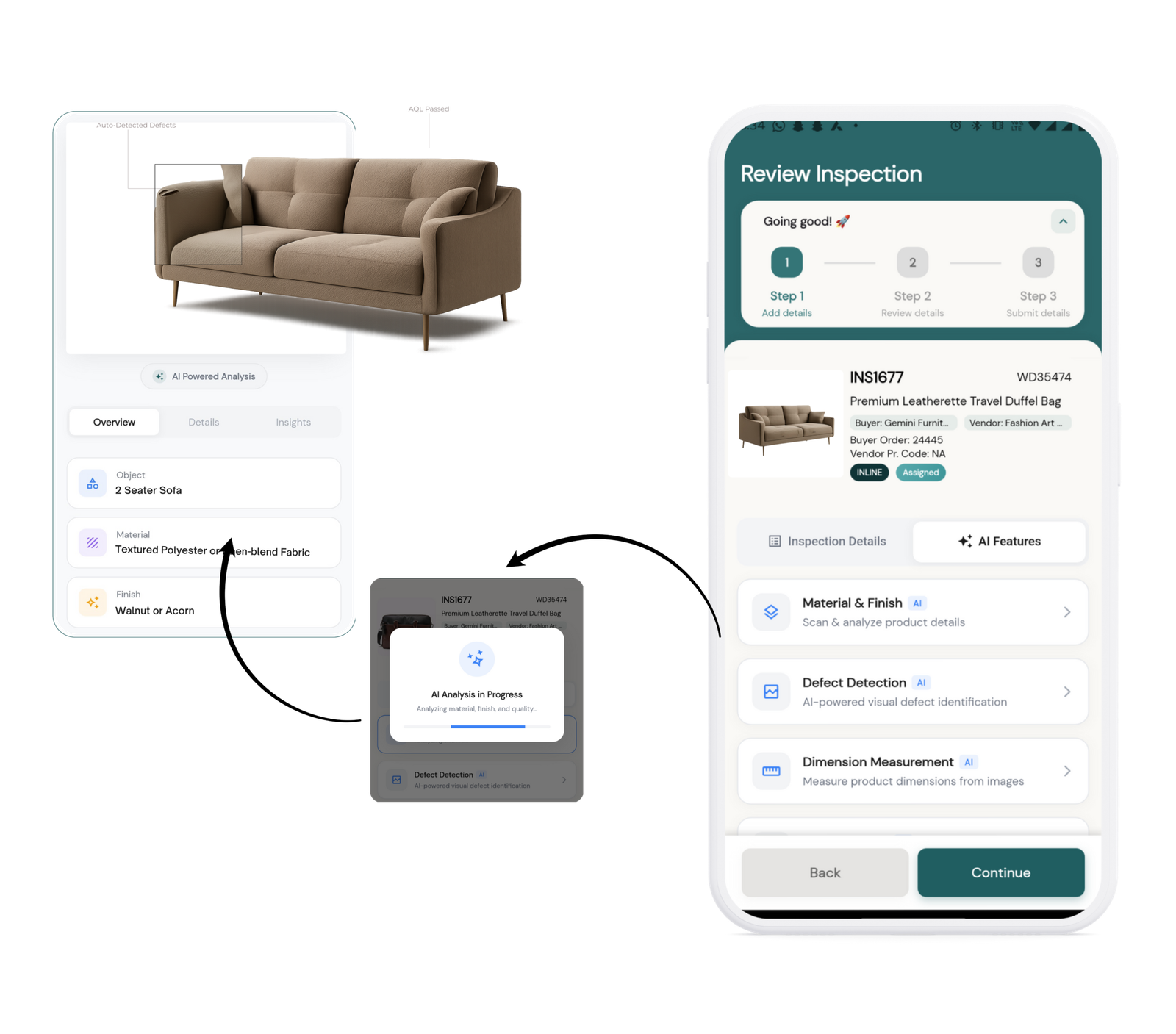
Let me tell you what actually happens when a human inspector examines five hundred units in a shift.
By unit two hundred, they’re fatigued. By three hundred, the lighting in the section they’ve moved to is slightly worse. By unit four hundred, identical products have a way of making variations invisible — the eye stops catching what it saw clearly at unit one. By five hundred, the inspector has done exactly what was asked of them. The problem isn’t effort. It’s a workflow that treats human attention as a constant when it isn’t.
We built AI defect detection into LookOver not to replace inspectors, but to give them a set of eyes that doesn’t get tired.
Two Problems, Two Tools
There are really two distinct things an inspector needs to catch: defects on a specific unit, and variation from what the product is supposed to look like. These sound related, but they’re different problems with different failure modes.
Absolute — a crack is a crack regardless of the reference image.
Relative — you need to know what the product is supposed to look like before you can say a unit diverges from it.
We handle them separately. Defect detection is one feature. Product comparison is another. Both use the same underlying vision model, but they’re asking it fundamentally different questions.
Defect Detection: Absolute Analysis
When an inspector captures an image and runs defect detection, LookOver sends that image to our vision model with a structured prompt that asks it to act as a quality control system. The model looks for visible damage — cracks, scratches, discoloration, surface irregularities, structural deformation — and returns a structured response we parse into the UI.
Every detected defect comes with:
- Severity classification — Critical, high, medium, or low, so inspectors triage effectively.
- Location description — Tells the inspector exactly where on the unit to look.
- Plain-language description — What the model saw, in the inspector’s language, no technical jargon, just the observation.
- Unit assessment — Rated across four levels (excellent, good, fair, poor), then stamped with a final call: pass, fail, or conditional.
The UI filters defects by severity, so an inspector can look at critical issues first and work down. In a fast-moving inspection, that triage matters. You want to know immediately if something is seriously wrong, not dig through a flat list.
Product Comparison: Relative Analysis
This is the more complex feature, and the one that matters most in practice.
The workflow starts with a reference image — typically the approved sample or a manufacturer’s spec image. The inspector then captures between one and five images of the units being inspected, from different angles if needed: front, side, top, detail, closeup. When they hit Compare, LookOver sends the full set to our vision model and asks it to evaluate each captured image against the reference.
Six Evaluation Parameters
Color
Tonal accuracy and consistency against the reference — catches deviations a fatigued eye misses.
Finish
Matte vs. satin vs. gloss and surface sheen — a common undetected variance in production.
Texture
Surface grain, smoothness, and tactile-visual characteristics visible in photography.
Material
Composition inference from visual surface properties and reflectance.
Dimensions
Relative proportion and structural geometry against the reference image.
Assembly
Structural integrity, component alignment, and fastening completeness.
Pre-Existing Defect Tracking
There’s a detail in the architecture that’s easy to overlook: when LookOver analyzes the reference image, it identifies and records any imperfections already present on the approved sample — a minor edge chip, a small mark that’s just part of how this product looks. Those get logged. When the model then evaluates captured units, it knows not to flag those same characteristics as defects.
Verdict System
The final verdict maps to one of five outcomes and four recommendations. These aren’t synonymous — a “major differences” verdict might still come back as “accept with notes” depending on the nature of the differences. The model produces both and lets the inspector and QA manager make the final call.
| Verdict | Recommendation |
|---|---|
| Identical | Accept |
| Acceptable | Accept with Notes |
| Minor Differences | Rework Required |
| Major Differences | Reject |
| Rejected | — |
What the Model Can’t Do
Worth being direct about what the model can’t do, since most AI feature writeups skip this part. The model works from a photo.
It cannot take a measurement — it can read proportions, not dimensions.
Material composition, hardness, weight — none of that is available from a surface image.
It gets things wrong sometimes. Every result comes with a confidence rating, from very high down to low.
A low-confidence output is an instruction to send a human, not a basis for a decision.
The intent is to make inspectors sharper, not to sideline them. The model surfaces what it sees. The inspector decides what to do about it.
What It Actually Changes
In a traditional inspection, a subtle color deviation on unit three hundred either gets caught because an inspector happened to notice it, or it doesn’t. There’s no systematic way to ensure consistency across a long run.
With LookOver’s comparison feature, every unit is evaluated against the same reference, by the same model, applying the same parameters. The variance that gets caught on unit three hundred is the same variance that would have been caught on unit one.
That consistency is the real value — not that the AI is smarter than an experienced inspector, but that it’s consistent in a way humans aren’t designed to be.
For QA managers, this changes what the data looks like. Instead of “inspector flagged 12 units as rejects,” you have match scores, specific variance descriptions, and parameter-level breakdowns across an entire lot. That’s the kind of data that traces back to a production root cause.
A systematic color variance isn’t a random defect problem — it’s a process calibration problem. The difference matters.
We built these features because quality inspection software should make inspectors more effective, not just faster. The offline-first architecture handles the connectivity problem. The AI layer handles the consistency problem. Together, they’re what it takes to actually work on a real factory floor — the same principle behind how LookOver handles AQL sampling inside the inspection workflow.